Phonox 2.0.4: Per-Record Notes, Discogs Lookups, and a Cleaner Value Panel
Phonox 2.0.4 ships today with a handful of changes that make your day-to-day cataloguing experience noticeably better. The headline feature is a per-record Notes field that Claude automatically populates when you analyse a record — and that you can freely edit afterwards. Alongside that, Discogs metadata lookups are back, and the estimated-value section in the Vinyl Panel has been tightened up.
Per-Record Notes — AI-Populated, User-Editable
Every record in your collection now has a Notes field.
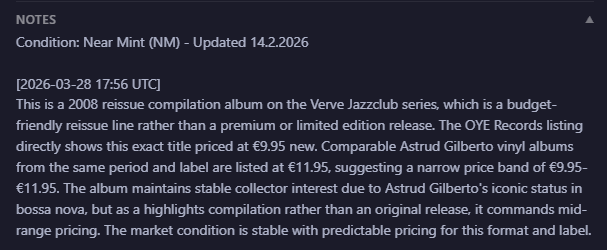
When you analyse a new record, Claude writes its valuation reasoning — the explanation behind the estimated price — straight into the Notes field. When you re-analyse an existing record, a new timestamped entry is appended rather than overwriting what’s already there, so you build up a running log of commentary over time.
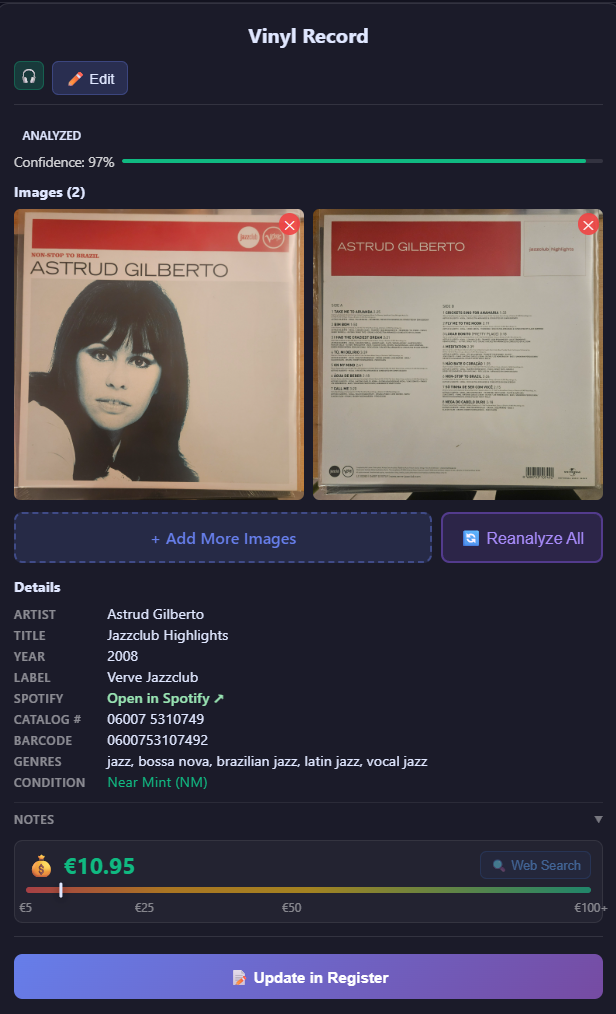
You can read the notes in view mode via a collapsible section (collapsed by default so it stays out of the way). The panel shows the Notes row with a ▼ toggle next to it — the compact 💰 value row sits immediately below:
Tap the toggle to expand the full Claude explanation:
In edit mode the field becomes a standard textarea, just like Artist or Title — type freely, paste in your own observations, delete Claude’s text if you don’t want it. Notes are only written back to the database when you press Update in Register, so nothing is lost accidentally.
What this is good for:
- Keeping Claude’s valuation reasoning next to the record it belongs to
- Adding your own buying-history or condition notes
- Building a searchable provenance log for rare or valuable pressings
Discogs Metadata Lookups Re-Enabled
Discogs lookups were silently disabled in a previous refactor. As of 2.0.4, lookup_metadata_from_both() correctly calls lookup_discogs_metadata() again, so every analysis run pulls catalog number, label, and pressing details from Discogs in addition to MusicBrainz.
If you have a Discogs personal access token you can now add it to .env:
DISCOGS_TOKEN=your_token_hereAdding a token raises your rate limit from 25 → 60 requests per minute. Without a token, anonymous lookups still work — the token is optional.
Compacted Value Section
The estimated-value area in the Vinyl Panel has been redesigned into a single compact row:
💰 €15 [🔍 Web Search]Underneath sits a slim 6 px colour-scale bar (green → red) showing where the estimate sits in the full price range. The condition badge — Very Good Plus (VG+) — has been removed from this row because it already appears in the Details list just above, so there is no need to show it twice.
The result is a denser, less cluttered panel that keeps all the information you need without the visual weight of the old multi-block layout.
Other Fixes in This Release
- MetadataEnhancer change descriptions were always showing the first entry for every changed field. A
change_indexcounter now maps each field to its correct description. - Re-analysis
NameError—vinyl_recordwas referenced in the reanalysis scope where onlyexisting_recordwas defined. Fixed. - Multi-line EXPLANATION capture — the single-line regex used to parse Claude’s valuation explanation was silently truncating notes that spanned multiple lines. Replaced with a
split('EXPLANATION:', 1)approach so the full explanation is always captured and stored.
Upgrading
Pull the latest code and restart your containers:
git pull
./start-cli.sh
The user_notes column is added automatically on startup if it does not already exist — no manual migration required.
These changes are part of an ongoing effort to make Phonox feel less like a cataloguing tool and more like a genuine collection companion — something that remembers context, surfaces the right information at the right time, and stays out of the way when you don’t need it.