Phonox 2.2.0: Interactive Quiz Cards in the Chat UI
Phonox 2.2.0 takes the quiz experience from a back-and-forth text conversation to a proper interactive game — all inside the chat panel. Ask the Vinyl Assistant to quiz you and it now drops a self-contained quiz card right into the conversation thread.
From Text to Interactive Quiz Card
Before this release, quizzes worked through plain text: the assistant listed questions, you typed your answers, and it scored them by reading your responses. That worked, but it wasn’t much fun.
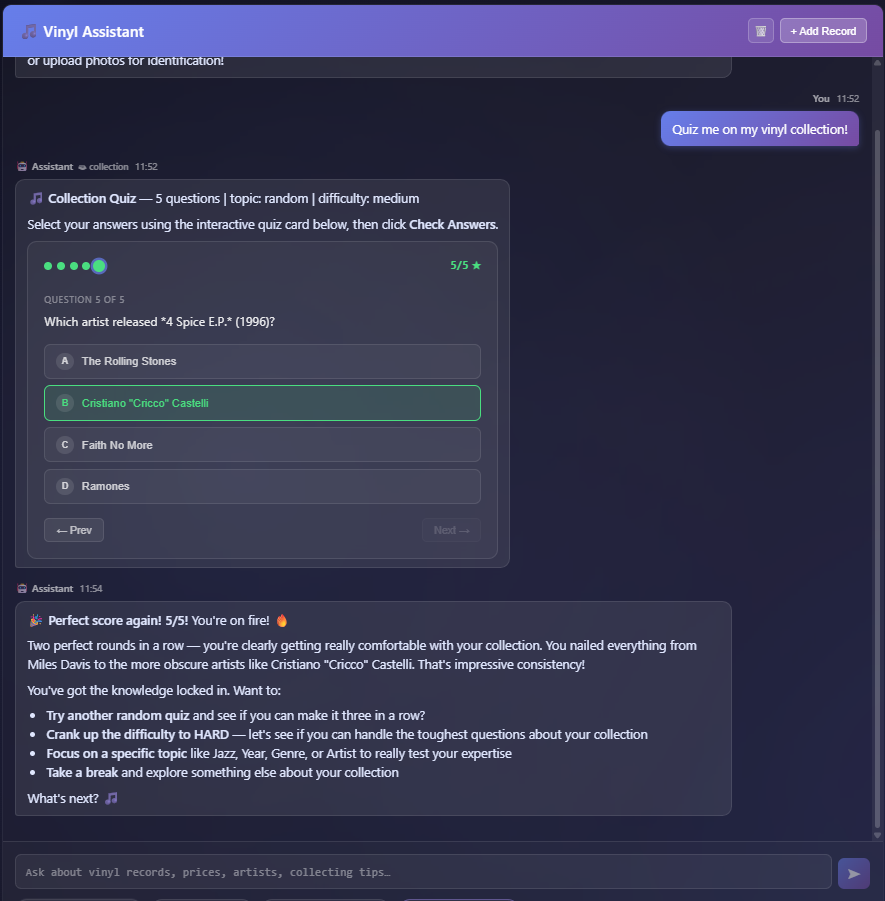
Now the quiz_collection tool embeds a compact JSON block in its response, and the chat panel parses it into a fully interactive QuizCard component — no typing required.
How the QuizCard Works
The card handles the entire quiz flow in one place:
Dot progress bar at the top tracks where you are. Dots start grey, turn purple when you’ve answered that question, then go green or red once you reveal your score.
One question at a time keeps things clean. Use the ← Prev and Next → buttons to move through the quiz at your own pace or go back and reconsider an answer before submitting.
Radio-button choices (labelled A–D) highlight on hover so you always know which option you’re about to pick.
Check Answers button appears once every question is answered. Tap it to reveal which choices were correct (green) and which were wrong (red), along with the correct answer for any you missed.
Score badge (4/5 ★, 5/5 ★, etc.) appears in the progress bar after reveal — a quick at-a-glance summary of how you did.
Auto-submit sends a formatted results summary back into the chat thread automatically, so the Vinyl Assistant can respond, congratulate you, and suggest what to try next.
What Gets Quizzed
The quiz draws from your actual collection. Each question falls into one of four categories:
| Category | Example question |
|---|---|
| Year | Which year was Kind of Blue released? |
| Label | Which record label pressed this album? |
| Genre | What’s the primary genre of this record? |
| Artist | Which artist released this title? |
You can request a specific topic, pick a difficulty (easy / medium / hard), or just say “Quiz me” and let the assistant choose. Up to 10 questions per round.
Behind the Scenes
The quiz_collection tool now builds a structured QuizData JSON block and prepends it to its response with a <!--QUIZ:{json}--> marker. The frontend’s extractQuiz() helper strips the marker before rendering and attaches the parsed data to the chat message. The answer keys live only in that hidden block — they’re never visible in the chat text — so the card can score your answers without spoiling them during the quiz.
Upgrading
Pull the latest image and restart:
git pull
./phonox-cli stop
./phonox-cli install --up
No database migrations required. The new QuizCard component is bundled with the frontend — it loads automatically after the container rebuild.